
TP-Link Archer BE3600
A dual-band Wi-Fi 7 router at BE3600 speeds, with 2.5Gbps WAN and LAN ports and a USB 3.0 port, at a mid-range price.
Check Price on AmazonOur verdict: The best wireless router in 2026 is the TP-Link Archer BE3600. It tops our ranking with 8.9 out of 10.
A dual-band Wi-Fi 7 router at BE3600 speeds, with 2.5Gbps WAN and LAN ports and a USB 3.0 port, at a mid-range price.
Check Price on Amazon
A tri-band Wi-Fi 7 router with five 2.5Gbps ports and a 6GHz band.
Check Price on Amazon
A cheap Wi-Fi 6 router that suits fibre plans up to around 500Mbps.
Check Price on Amazon
We compared 19 wireless routers sold in the UK, then ranked ten of them by how happy owners are. These ten cover budget Wi-Fi 6 boxes, dual-band and tri-band Wi-Fi 7 models, a gaming-focused flagship and a VDSL modem router, across a wide price range. Every product links to its full review below.
TP-Link Archer BE3600Best Choice
8.9 out of 10
Check Price
TP-Link Archer AX53Value for Money
8.7 out of 10
Check Price
TP-Link Archer BE550Best Premium
8.7 out of 10
Check Price
 ASUS RT-BE58U
8.5 out of 10
Check Price
 ASUS RT-BE86U
8.5 out of 10
Check Price
MERCUSYS MR80XBest Budget
8.5 out of 10
Check Price
 ASUS RT-AX55
8.5 out of 10
Check Price
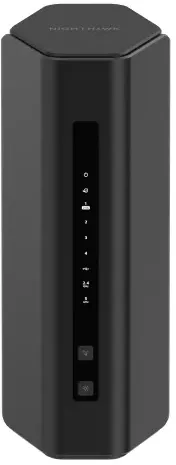 NETGEAR Nighthawk RS200
8.3 out of 10
Check Price
 MERCUSYS MR47BE
8.3 out of 10
Check Price
 AVM FRITZ!Box 7530 AX UK
8.2 out of 10
Check Price
The TP-Link Archer BE3600 (8.9) beats the TP-Link Archer AX53 (8.7) because it is the newer design and leaves owners a little happier.
A dual-band Wi-Fi 7 router at BE3600 speeds, with 2.5Gbps WAN and LAN ports and a USB 3.0 port, at a mid-range price.
Each bar shows its place in this guide, so a full bar is 1st of 10. How happy owners are counts for most of the score.
A cheap Wi-Fi 6 router that suits fibre plans up to around 500Mbps. Owners report easy setup and steady signal in flats and small houses.
Each bar shows its place in this guide, so a full bar is 1st of 10. How happy owners are counts for most of the score.
A tri-band Wi-Fi 7 router with five 2.5Gbps ports and a 6GHz band. It suits full-fibre plans and homes with plenty of wired kit.
Each bar shows its place in this guide, so a full bar is 1st of 10. How happy owners are counts for most of the score.
A dual-band Wi-Fi 7 router with ASUS's full feature set: 2.5Gbps WAN, AiMesh, free security and strong parental controls.
Each bar shows its place in this guide, so a full bar is 1st of 10. How happy owners are counts for most of the score.
The gaming-minded flagship here. A BE6800 dual-band Wi-Fi 7 router with a 10Gbps port and four 2.5Gbps ports, one of which can be set as a dedicated gaming port.
Each bar shows its place in this guide, so a full bar is 1st of 10. How happy owners are counts for most of the score.
One of the cheapest AX3000 Wi-Fi 6 routers here. It is a plain, reliable box for flats and small homes on fibre plans below 500Mbps.
Each bar shows its place in this guide, so a full bar is 1st of 10. How happy owners are counts for most of the score.
A budget Wi-Fi 6 router with ASUS's app and security tools. It is a modest AX1800 box that works well for light households.
Each bar shows its place in this guide, so a full bar is 1st of 10. How happy owners are counts for most of the score.
A dual-band Wi-Fi 7 router from a familiar name, rated at BE6500. It pairs a 2.5Gbps WAN port with a USB 3.0 socket.
Each bar shows its place in this guide, so a full bar is 1st of 10. How happy owners are counts for most of the score.
A tri-band Wi-Fi 7 router with four 2.5Gbps ports and a 6GHz band, priced below the other tri-band model here.
Each bar shows its place in this guide, so a full bar is 1st of 10. How happy owners are counts for most of the score.
A VDSL and ADSL modem router with Wi-Fi 6, made for UK copper broadband. It also works as a DECT base station for cordless phones.
Each bar shows its place in this guide, so a full bar is 1st of 10. How happy owners are counts for most of the score.
For most homes, Wi-Fi 6 is enough. It handles broadband plans up to about 1Gbps and works with the phones and laptops most people have bought in the last few years. Wi-Fi 7 mainly adds headroom for multi-gig plans and for newer devices such as recent iPhones, Galaxy phones and laptops. If you want to keep a router for five years, Wi-Fi 7 is the safer bet. Wi-Fi 6E and tri-band Wi-Fi 7 routers add the 6GHz band, which is faster over short distances but loses range through walls. Dual-band Wi-Fi 7 models do not have it.
It depends on your provider's hub and your home. Many supplied hubs cope well in a small flat, but owners with bigger houses or many devices often report weak signal upstairs and few settings. A standalone router adds better antennas, stronger parental controls, more ports and regular security updates. If your hub works fine and you have no dead spots, there is little reason to switch.
Yes with all of them, but the setup differs. On full fibre (FTTP), the provider's box turns the fibre signal into Ethernet, so any plain router works from its WAN port. On FTTC (fibre to the cabinet) you need a VDSL modem, either a separate one or a modem router such as the Fritz!Box 7530 AX UK. Virgin Media needs its hub put into modem mode first. Where your provider's hub stays connected, turn off its Wi-Fi to avoid two networks, and check the provider's help page for any login details they require, since Plusnet and some others do.
Match the router's wired ports to your plan first. A plan up to 900Mbps works on gigabit ports. A 1Gbps plan or faster needs a 2.5Gbps WAN port to use the full speed. Wi-Fi labels such as AX3000 or BE6500 are combined speeds across all bands, not what one device gets, so most homes do well with AX3000 or BE3600. Choose BE6500 or higher for multi-gig plans or crowded networks.
Put it in a central spot, raised off the floor, in the open. Avoid cupboards, TV units and the back of a metal shelf. Keep it away from thick walls, microwaves and fish tanks. Routers with external antennas let you angle them, while internal-antenna models such as the Archer BE550 rely on beamforming to point the signal at your devices. If the best spot is far from your phone socket or ONT, run a cable from the master socket rather than moving the router into a corner.
A single router covers most flats and houses of two or three bedrooms. Three or more floors, thick stone walls or a long narrow layout are cases where one router leaves dead spots. In those homes, a mesh system with several units gives more even coverage. Routers with EasyMesh (TP-Link and Mercusys) or AiMesh (ASUS) can add compatible units later, so you can start with one router and add a node if you find dead spots. Our mesh Wi-Fi guide covers the dedicated systems.
Every score here comes from our ranking model; no editor sets the order. We haven't read the review sites for this guide yet, so for now it is led by owners. It ranks products by how happy owners are, holding back any product few owners have rated until more agree. How many rated it and how new it is only settle close calls, and value for money earns its own badge rather than a higher place. We compared 19 models for this guide before settling on these ten.
Brands can't pay to be included or to move up. We last checked these picks in November 2026.
How we rank, in fullA dual-band Wi-Fi 7 router at BE3600 speeds, with 2.5Gbps WAN and LAN ports and a USB 3.0 port, at a mid-range price. 8.9 out of 10.