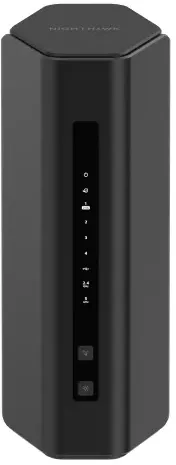
Our verdict: The TP-Link Archer AX53 ranks 2nd of the 10 wireless routers we compare, with 8.7 out of 10. It takes our Value for Money badge.
TP-Link Archer AX53
8.7/10Value for Money
The TP-Link Archer AX53 is a dual-band AX3000 Wi-Fi 6 router with four external antennas and five gigabit ports. It suits flats and small to mid-sized houses on broadband up to about 500Mbps.
Four external antennas and beamforming for steady coverage
EasyMesh compatible, with VPN server support
Keep in mind
Gigabit ports cap wired speeds, so it is a poor match for multi-gig full fibre
No USB port
Dual-band only, with no 6GHz band
Why the TP-Link Archer AX53 scores 8.7
Each bar shows where it places among the 10 wireless routers in this guide, so a full bar is 1st of 10. How happy owners are counts for most of the score.
How happy owners are2nd of 10
How many rated it1st of 10
How new it is9th of 10
Why it sits behind the TP-Link Archer BE3600
The TP-Link Archer BE3600 (8.9) beats the TP-Link Archer AX53 (8.7) because it is the newer design and leaves owners a little happier.
About the TP-Link Archer AX53
The Archer AX53 is a router, not a modem. It needs a separate modem or ONT from your broadband provider, and it can also run in access point mode. It is rated for three-bedroom houses.
Wi-Fi is dual-band: up to 2402Mbps on 5GHz (using 160MHz channels) and 574Mbps on 2.4GHz. There is no 6GHz band. Four fixed external antennas, beamforming and a dual-core CPU handle the radio side. Ports are one gigabit WAN and four gigabit LAN, so wired speeds top out at 1Gbps. There is no USB port.
Features include OFDMA, Target Wake Time, guest networks on both bands, WPA3, parental controls and device-based QoS. It has a built-in VPN server (OpenVPN and PPTP), port forwarding, DMZ, UPnP and dynamic DNS. It works with EasyMesh devices and with TP-Link OneMesh products. TP-Link's HomeShield covers basic security scans and parental controls, and Expert Reviews notes that the extra HomeShield Pro tier is a paid subscription.
You set it up with the Tether app or a web interface. The box holds the router, power adapter, an Ethernet cable and a quick installation guide.
What owners report about the TP-Link Archer AX53
We found little owner feedback for this exact model from UK retailers. What we did read came from Expert Reviews and TP-Link's community forum, and forums skew towards people with problems.
The independent review found the router a respectable budget Wi-Fi 6 option, but not a stand-out one. Speeds were close to rivals at a similar price in most rooms, slower than the Linksys MR7350, and dropped noticeably in the furthest room. Small, hard-to-read LED icons and the lack of a USB port were also marked against it.
Forum owners report intermittent trouble. Examples are a wired PS5 randomly losing its connection, and a PPPoE session dropping mid-download that survived several firmware versions. TP-Link staff in these threads suggested checking cables, turning off QoS and updating firmware, and no fix was confirmed in either thread. These are individual cases, not proof that every unit has the fault.
Who the TP-Link Archer AX53 suits
The AX53 suits flats and small houses with a fibre or cable plan of up to about 500Mbps, where a cheap move to Wi-Fi 6 makes sense. It also fits anyone already using TP-Link or EasyMesh gear who wants a VPN server built in.
Look elsewhere if your plan is multi-gig, since the gigabit ports cap wired speed: the TP-Link Archer BE3600 has 2.5Gbps ports and a USB port. For 6GHz, the MERCUSYS MR47BE is a tri-band option. If you need a modem for UK copper broadband, the AVM FRITZ!Box 7530 AX UK has one built in.
Questions about the TP-Link Archer AX53
Is the TP-Link Archer AX53 Wi-Fi 6?
Yes. It is an AX3000 Wi-Fi 6 (802.11ax) router, with up to 2402Mbps on 5GHz and 574Mbps on 2.4GHz. It has no 6GHz band.
Is the TP-Link Archer AX53 a modem or a router?
It is a router only. It connects to a separate modem or ONT from your broadband provider through its gigabit WAN port.
How do you set up the TP-Link Archer AX53?
Use the Tether app or the web interface. The box includes the power adapter and an Ethernet cable for connecting to your modem.
Does the TP-Link Archer AX53 have a USB port?
No. It has one gigabit WAN port and four gigabit LAN ports, and no USB.
Does the TP-Link Archer AX53 support mesh?
Yes. It works with EasyMesh devices and with TP-Link OneMesh products.
Other wireless router picks
The other badge winners in our wireless routers ranking.
Every score here comes from our ranking model; no editor sets the order. We haven't read the review sites for this guide yet, so for now it is led by owners. It ranks products by how happy owners are, holding back any product few owners have rated until more agree. How many rated it and how new it is only settle close calls, and value for money earns its own badge rather than a higher place. We compared 19 models for this guide before settling on these ten.
Brands can't pay to be included or to move up. We last checked these picks in November 2026.