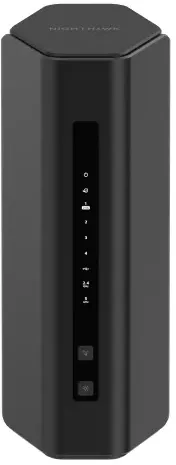
Our verdict: The TP-Link Archer BE550 ranks 3rd of the 10 wireless routers we compare, with 8.7 out of 10. It takes our Best Premium badge.
TP-Link Archer BE550
8.7/10Best Premium
The TP-Link Archer BE550 is a tri-band Wi-Fi 7 router with five 2.5Gbps ports and a 6GHz band. It suits full-fibre homes of average size with plenty of wired kit, and less so large houses.
Five 2.5Gbps ports, so the WAN and four LAN sockets can all carry multi-gig speeds
Tri-band with a 6GHz band that keeps Wi-Fi 7 and Wi-Fi 6E devices off the crowded channels
USB 3.0 port for a storage drive or printer
EasyMesh support for adding a compatible unit later
Keep in mind
Six internal antennas cover an average house well but not a large or thick-walled one
The 6GHz band loses range quickly through walls
Few phones and laptops can use the full Wi-Fi 7 speeds yet
Why the TP-Link Archer BE550 scores 8.7
Each bar shows where it places among the 10 wireless routers in this guide, so a full bar is 1st of 10. How happy owners are counts for most of the score.
How happy owners are3rd of 10
How many rated it5th of 10
How new it is6th of 10
Level with the TP-Link Archer AX53
The TP-Link Archer AX53 and the TP-Link Archer BE550 score the same, so either is a safe pick. The TP-Link Archer AX53 goes first because it leaves owners a little happier. The TP-Link Archer BE550 is the newer design. It takes our Best Premium badge.
About the TP-Link Archer BE550
The BE550 is a tri-band router on the 802.11be standard. The 6GHz band is rated up to 5760Mbps, the 5GHz band up to 2880Mbps and the 2.4GHz band up to 688Mbps. TP-Link gives a combined figure of 9328Mbps. Six internal antennas handle beamforming, and the 6GHz band supports 320MHz channels. Multi-Link Operation, 4K-QAM, OFDMA and 2x2 MU-MIMO are all listed.
On the back are one 2.5Gbps WAN port, four 2.5Gbps LAN ports and one USB 3.0 port. The USB port reads NTFS, exFAT, HFS+ and FAT32 drives and can run an FTP, media or Samba server. It works in router mode or access point mode, and it is compatible with EasyMesh routers and extenders. TP-Link notes that firmware differences between vendors can stop an EasyMesh link from forming.
You manage it through the Tether app or a web interface. Expert Reviews found the app clear but limited: port forwarding and the IP address pool need a browser. There is a guest network on each band, VPN server and client support (OpenVPN, PPTP, L2TP and WireGuard), per-device QoS and a separate IoT network. The free Basic Plan of HomeShield is included. The Pro Plan is paid. Expert Reviews says the full security and parental control features need a subscription.
The box holds the router, a power adapter, an Ethernet cable and a quick installation guide. The router is a tall, chunky unit, and Expert Reviews found it larger than ideal.
What owners report about the TP-Link Archer BE550
Owner feedback we could find for this exact model is mostly in TP-Link's own community forum, and it is thin and skewed towards problems, as people tend to post when something breaks. One owner on a gigabit plan reported getting the full line speed and no drop-outs in the first day. They found older devices connected poorly to the combined Wi-Fi 7 network and said the settings could be explained better.
The complaint that comes up most is stability. Owners of both hardware versions describe internet or Wi-Fi drop-outs, and one described speeds sliding from the 800s down to a few hundred Mbps after some hours until a reboot. Several of these threads end without a confirmed fix. TP-Link staff point people to newer or pre-release firmware, and one owner of the related Pro model said turning off Multi-Link Operation helped.
These threads are self-reported and cover several firmware versions, so they don't show how many units are affected. Check the firmware is up to date on setup, and keep your receipt in case you need a replacement.
Who the TP-Link Archer BE550 suits
The BE550 fits a full-fibre plan well above 1Gbps, or a home with a NAS, games console, PC and access points that can each use a multi-gig socket. The USB 3.0 port and EasyMesh add flexibility. The 6GHz band is best for devices in the same room or one wall away.
Look elsewhere for a large or thick-walled house: the 6GHz band loses range through walls, and Expert Reviews found it weaker in a far dining room. The ASUS RT-BE58U is a better fit if you want free security and parental controls. The MERCUSYS MR47BE is a tri-band alternative with four 2.5Gbps ports. If you have a slower plan and no multi-gig kit, the TP-Link Archer AX53 is enough.
Questions about the TP-Link Archer BE550
How do I set up the TP-Link Archer BE550?
Plug the router's 2.5Gbps WAN port into your modem or ONT, power it on, then use the Tether app or the web interface to finish setup. The box includes an Ethernet cable and a quick installation guide. It ships with one network name for all bands, which you can split later.
Is the TP-Link Archer BE550 a modem or a router?
It is a router. It has no built-in modem, so it connects to your broadband modem or fibre ONT through its 2.5Gbps WAN port.
Does the TP-Link Archer BE550 need a subscription?
No, it works without one. The free HomeShield Basic Plan is included, and the Pro Plan is paid. Expert Reviews says the full security and parental control features need a subscription.
What is the TP-Link BE9300?
BE9300 is the speed class TP-Link uses for the BE550, whose combined rating is 9328Mbps. Owners in TP-Link's forum use the BE550 and BE9300 names together for this router.
Does the TP-Link Archer BE550 work as an access point or with mesh?
Yes to both. It has an access point mode and is compatible with EasyMesh routers and extenders. TP-Link says firmware conflicts between vendors can stop an EasyMesh connection.
What warranty does the TP-Link Archer BE550 have?
TP-Link UK lists 3 years for its SOHO products. It says you must register the product when you claim, and keep the invoice or receipt. The warranty covers products bought from TP-Link UK or its authorised retailers and used in the UK and Ireland.
Other wireless router picks
The other badge winners in our wireless routers ranking.
Every score here comes from our ranking model; no editor sets the order. We haven't read the review sites for this guide yet, so for now it is led by owners. It ranks products by how happy owners are, holding back any product few owners have rated until more agree. How many rated it and how new it is only settle close calls, and value for money earns its own badge rather than a higher place. We compared 19 models for this guide before settling on these ten.
Brands can't pay to be included or to move up. We last checked these picks in November 2026.